> ## Documentation Index
> Fetch the complete documentation index at: https://upstash-docs-landing-rework.mintlify.site/llms.txt
> Use this file to discover all available pages before exploring further.

# Getting Started

> Create an Upstash Redis database in seconds

export const Migrate = ({product, cols = 3}) => {
  const sources = [{
    name: "Redis Cloud",
    product: "redis"
  }, {
    name: "AWS ElastiCache",
    product: "redis"
  }, {
    name: "Amazon DynamoDB",
    product: "redis"
  }, {
    name: "GCP Memorystore",
    product: "redis"
  }, {
    name: "Azure Cache for Redis",
    product: "redis"
  }, {
    name: "Self-hosted Redis",
    product: "redis"
  }];
  const items = sources.filter(s => !product || s.product === product);
  return <div className="u-grid u-grid--fixed3">
      {items.map(s => <div key={s.name} className="u-card u-card--static">
          <div className="u-card__icon u-card__icon--muted">⇄</div>
          <div className="u-card__body">
            <div className="u-card__title">{s.name}</div>
            <div className="u-card__desc">Guide coming soon</div>
          </div>
        </div>)}
    </div>;
};

export const Catalog = ({product, type, featured, cols = 3}) => {
  const catalog = [{
    title: "@upstash/redis",
    description: "HTTP-based Redis client for serverless and edge.",
    href: "/redis/sdks/ts/overview",
    product: "redis",
    type: "sdk",
    lang: "typescript",
    featured: true
  }, {
    title: "upstash-redis (Python)",
    description: "Serverless Redis client for Python.",
    href: "/redis/sdks/py/overview",
    product: "redis",
    type: "sdk",
    lang: "python"
  }, {
    title: "@upstash/ratelimit",
    description: "Rate limiting for serverless, built on Redis.",
    href: "/redis/sdks/ratelimit-ts/overview",
    product: "redis",
    type: "sdk",
    lang: "typescript",
    featured: true
  }, {
    title: "ratelimit (Python)",
    description: "Rate limiting SDK for Python.",
    href: "/redis/sdks/ratelimit-py/overview",
    product: "redis",
    type: "sdk",
    lang: "python"
  }, {
    title: "@upstash/vector",
    description: "Vector database client for AI and LLM apps.",
    href: "/vector/sdks/ts/getting-started",
    product: "vector",
    type: "sdk",
    lang: "typescript",
    featured: true
  }, {
    title: "upstash-vector (Python)",
    description: "Vector database client for Python.",
    href: "/vector/sdks/py/gettingstarted",
    product: "vector",
    type: "sdk",
    lang: "python"
  }, {
    title: "@upstash/qstash",
    description: "Publish messages and schedule jobs over HTTP.",
    href: "/qstash/sdks/ts/overview",
    product: "qstash",
    type: "sdk",
    lang: "typescript",
    featured: true
  }, {
    title: "qstash-py",
    description: "QStash messaging and scheduling for Python.",
    href: "/qstash/sdks/py/overview",
    product: "qstash",
    type: "sdk",
    lang: "python"
  }, {
    title: "@upstash/workflow",
    description: "Durable serverless functions and workflows.",
    href: "/workflow/getstarted",
    product: "workflow",
    type: "sdk",
    lang: "typescript",
    featured: true
  }, {
    title: "@upstash/search",
    description: "Full-text and semantic search client.",
    href: "/search/sdks/ts/getting-started",
    product: "search",
    type: "sdk",
    lang: "typescript",
    featured: true
  }, {
    title: "BullMQ",
    description: "Message queue built on Redis.",
    href: "/redis/integrations/bullmq",
    product: "redis",
    type: "integration",
    lang: "typescript",
    featured: true
  }, {
    title: "Drizzle",
    description: "Cache Drizzle ORM queries with Upstash Redis.",
    href: "/redis/integrations/drizzle",
    product: "redis",
    type: "integration",
    lang: "typescript",
    featured: true
  }, {
    title: "Celery",
    description: "Use Upstash Redis as a Celery broker.",
    href: "/redis/integrations/celery",
    product: "redis",
    type: "integration",
    lang: "python"
  }, {
    title: "Sidekiq",
    description: "Background jobs for Ruby on Upstash Redis.",
    href: "/redis/integrations/sidekiq",
    product: "redis",
    type: "integration",
    lang: "ruby"
  }, {
    title: "MCP Server",
    description: "Manage Upstash Redis from AI agents via MCP.",
    href: "/redis/integrations/mcp",
    product: "redis",
    type: "integration",
    lang: "typescript"
  }, {
    title: "n8n (Redis)",
    description: "Automate workflows with Redis nodes in n8n.",
    href: "/redis/integrations/n8n",
    product: "redis",
    type: "integration",
    lang: "typescript"
  }, {
    title: "Prometheus (Redis)",
    description: "Scrape Upstash Redis metrics into Prometheus.",
    href: "/redis/integrations/prometheus",
    product: "redis",
    type: "integration",
    lang: "typescript"
  }, {
    title: "LangChain",
    description: "Vector store integration for LLM apps.",
    href: "/vector/integrations/langchain",
    product: "vector",
    type: "integration",
    lang: "python",
    featured: true
  }, {
    title: "Vercel AI SDK",
    description: "Back the AI SDK with Upstash Vector.",
    href: "/vector/integrations/ai-sdk",
    product: "vector",
    type: "integration",
    lang: "typescript",
    featured: true
  }, {
    title: "LlamaIndex",
    description: "Use Upstash Vector as a LlamaIndex store.",
    href: "/vector/integrations/llamaindex",
    product: "vector",
    type: "integration",
    lang: "python"
  }, {
    title: "Flowise",
    description: "Build LLM flows on Upstash Vector.",
    href: "/vector/integrations/flowise",
    product: "vector",
    type: "integration",
    lang: "typescript"
  }, {
    title: "Langflow",
    description: "Visual LLM apps backed by Upstash Vector.",
    href: "/vector/integrations/langflow",
    product: "vector",
    type: "integration",
    lang: "python"
  }, {
    title: "LlamaParse",
    description: "Parse and index documents into Upstash Vector.",
    href: "/vector/integrations/llamaparse",
    product: "vector",
    type: "integration",
    lang: "python"
  }, {
    title: "Resend",
    description: "Send emails from QStash workflows.",
    href: "/qstash/integrations/resend",
    product: "qstash",
    type: "integration",
    lang: "typescript",
    featured: true
  }, {
    title: "Anthropic",
    description: "Call Claude reliably through QStash.",
    href: "/qstash/integrations/anthropic",
    product: "qstash",
    type: "integration",
    lang: "typescript"
  }, {
    title: "LLM APIs",
    description: "Queue and retry LLM calls with QStash.",
    href: "/qstash/integrations/llm",
    product: "qstash",
    type: "integration",
    lang: "typescript"
  }, {
    title: "Datadog",
    description: "Monitor QStash with Datadog.",
    href: "/qstash/integrations/datadog",
    product: "qstash",
    type: "integration",
    lang: "typescript"
  }, {
    title: "Pipedream",
    description: "Trigger Pipedream workflows from QStash.",
    href: "/qstash/integrations/pipedream",
    product: "qstash",
    type: "integration",
    lang: "typescript"
  }, {
    title: "n8n (QStash)",
    description: "Publish QStash messages from n8n.",
    href: "/qstash/integrations/n8n",
    product: "qstash",
    type: "integration",
    lang: "typescript"
  }, {
    title: "Docusaurus",
    description: "Add full-text search to a Docusaurus site.",
    href: "/search/integrations/docusaurus",
    product: "search",
    type: "integration",
    lang: "typescript"
  }, {
    title: "AI SDK Code Interpreter",
    description: "Run AI-generated code in a Box sandbox.",
    href: "/box/guides/ai-sdk-code-interpreter",
    product: "box",
    type: "demo",
    lang: "typescript",
    featured: true
  }, {
    title: "E-commerce Order Fulfillment",
    description: "Durable order processing with Workflow.",
    href: "/workflow/examples/eCommerceOrderFulfillment",
    product: "workflow",
    type: "demo",
    lang: "typescript",
    featured: true
  }, {
    title: "Image Processing",
    description: "Fan-out image jobs with Workflow.",
    href: "/workflow/examples/imageProcessing",
    product: "workflow",
    type: "demo",
    lang: "typescript",
    featured: true
  }, {
    title: "Customer Onboarding",
    description: "Multi-step onboarding flow with delays.",
    href: "/workflow/examples/customerOnboarding",
    product: "workflow",
    type: "demo",
    lang: "typescript"
  }, {
    title: "Payment Retry",
    description: "Retry failed payments with backoff.",
    href: "/workflow/examples/paymentRetry",
    product: "workflow",
    type: "demo",
    lang: "typescript"
  }, {
    title: "Wait for Event",
    description: "Pause a workflow until an external event.",
    href: "/workflow/examples/waitForEvent",
    product: "workflow",
    type: "demo",
    lang: "typescript"
  }, {
    title: "Auth Webhook",
    description: "Handle auth webhooks durably.",
    href: "/workflow/examples/authWebhook",
    product: "workflow",
    type: "demo",
    lang: "typescript"
  }];
  const matchesProduct = entry => !product || (Array.isArray(entry.product) ? entry.product.includes(product) : entry.product === product);
  const items = catalog.filter(entry => matchesProduct(entry) && (!type || entry.type === type) && (!featured || entry.featured));
  const gridClass = "u-grid " + (cols >= 3 ? "u-grid--3" : "u-grid--2");
  return <div className={gridClass}>
      {items.map(entry => <a key={entry.href} href={entry.href} className="u-card">
          <img className="u-card__icon" src={`/img/icons/lang/${entry.lang}.svg`} alt={entry.lang} />
          <div className="u-card__body">
            <div className="u-card__title">{entry.title}</div>
            <div className="u-card__desc">{entry.description}</div>
          </div>
        </a>)}
    </div>;
};

Upstash Redis is a **highly available, infinitely scalable** Redis-compatible database:

* 99.99% uptime guarantee with auto-scaling ([Prod Pack](/redis/overall/enterprise#prod-pack-features))
* Ultra-low latency worldwide
* Multi-region replication
* Multi-Zone High Availability ([Prod Pack](/redis/overall/enterprise#prod-pack-features))
* Durable, persistent storage without sacrificing performance
* Automatic backups
* Optional SOC-2 compliance, encryption at rest and much more

<Snippet file="redis/start-redis-snippet.mdx" />

***

## 1. Create an Upstash Redis Database

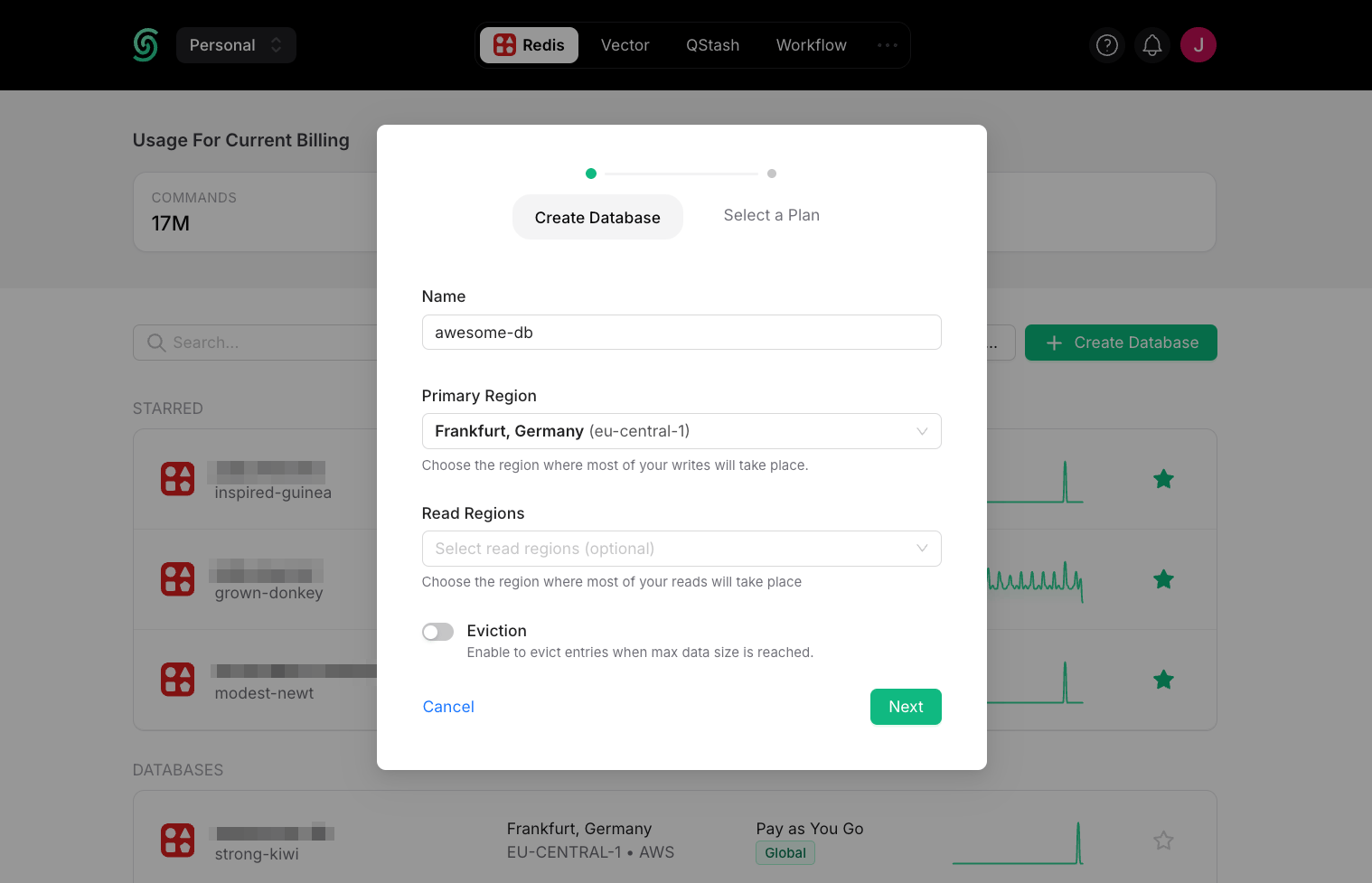
Log in to the [Upstash Console](https://console.upstash.com) (or [sign up](https://console.upstash.com) for a free account). From the **Redis** tab, click `+ Create Database` in the upper right corner. A dialog opens up:

<Frame>
  <img src="https://mintcdn.com/upstash-docs-landing-rework/2ryyMafw3RQR8NCo/img/getting_started/create-global.png?fit=max&auto=format&n=2ryyMafw3RQR8NCo&q=85&s=2b895dbd54f5c01cd7e00839837d5320" width="1518" height="977" data-path="img/getting_started/create-global.png" />
</Frame>

**Database Name:** Enter a name for your database.

**Primary Region and Read Regions:** For optimal performance, select the Primary Region closest to where most of your writes will occur. Select the read region(s) where most of your reads will occur.

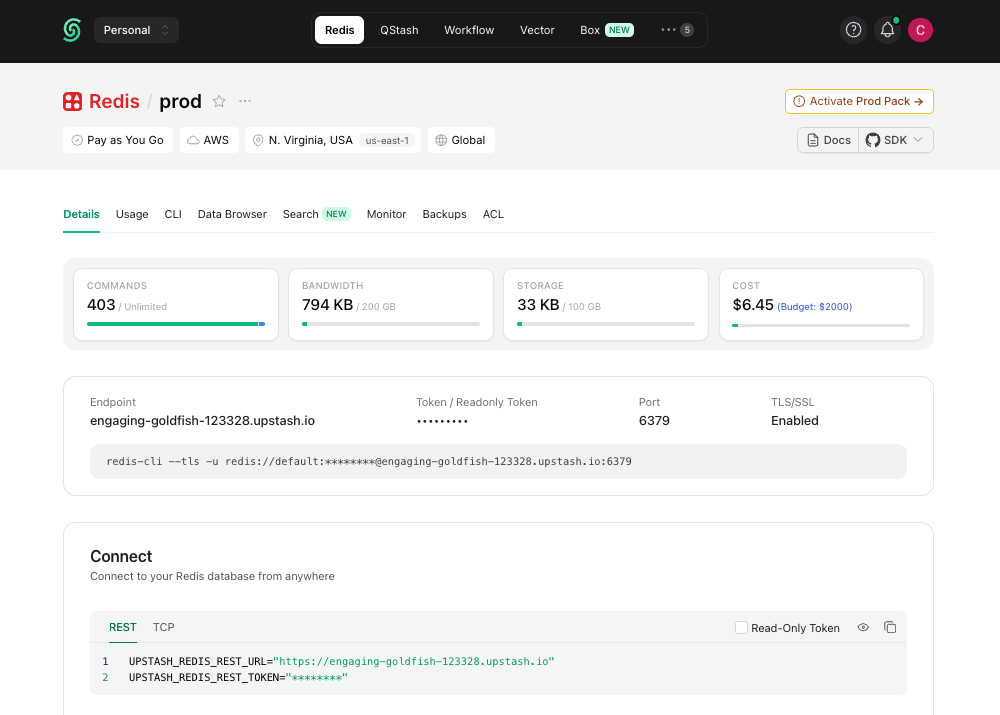
Once you click `Next` and select a plan, your database is running and ready to connect:
<Frame>
  <img src="https://mintcdn.com/upstash-docs-landing-rework/2ryyMafw3RQR8NCo/img/getting_started/database.png?fit=max&auto=format&n=2ryyMafw3RQR8NCo&q=85&s=92b93733b712607608e992bddf9ccaeb" width="100%" data-path="img/getting_started/database.png" />
</Frame>

***

## 2. Connect to Your Database

You can connect to Upstash Redis with any Redis client. For simplicity, we'll use `redis-cli`. See the [Connect Your Client](../howto/connect-client) section for connecting via our TypeScript or Python SDKs and other clients.

<Tip>
  You can copy the `redis-cli` command to connect to your database from the **Details** tab of your database in the Upstash Console.
</Tip>

The Redis CLI is included in the official Redis distribution. If you don't
have Redis installed, you can get it [here](https://redis.io/docs/latest/operate/oss_and_stack/install/install-redis/).

Connect to your database and execute commands on it:

```bash theme={null}
> redis-cli --tls -a PASSWORD -h ENDPOINT -p PORT
ENDPOINT:PORT> set counter 0
OK
ENDPOINT:PORT> get counter
"0"
ENDPOINT:PORT> incr counter
(int) 1
ENDPOINT:PORT> incr counter
(int) 2
```

As you run commands, you'll see updates to your database metrics in (almost) real-time. These database metrics are refreshed every 10 seconds.

<Frame>
  <img src="https://mintcdn.com/upstash-docs-landing-rework/2ryyMafw3RQR8NCo/img/getting_started/charts.png?fit=max&auto=format&n=2ryyMafw3RQR8NCo&q=85&s=9db25eb9fc313e83ecdb7a43681d4189" width="100%" data-path="img/getting_started/charts.png" />
</Frame>

Congratulations! You have created an ultra-fast Upstash Redis database! 🎉

<Check>
  **New: Manage Upstash Redis with your agent**

  Manage Upstash Redis databases from Claude and other AI tools by using our [MCP server](/agent-resources/mcp).
</Check>

## Next steps

* [Connect your client](../howto/connect-client): TypeScript, Python, Go, Java, and other Redis clients.
* [Use cases](/redis/overall/usecases): caching, rate limiting, queues, pub/sub, AI workloads, and more.
* [Upstash Redis Search](/redis/search/introduction): full-text search built into Upstash Redis.
* [REST API](/redis/features/restapi): connect from edge and serverless runtimes where TCP is restricted.
* [Pricing & Billing](/redis/overall/billing): free tier, Pay-As-You-Go, and Fixed plan limits, plus how billing works.

## SDKs

<Catalog product="redis" type="sdk" cols={3} />

## Integrations

<Catalog product="redis" type="integration" cols={3} />

## Do more from the console

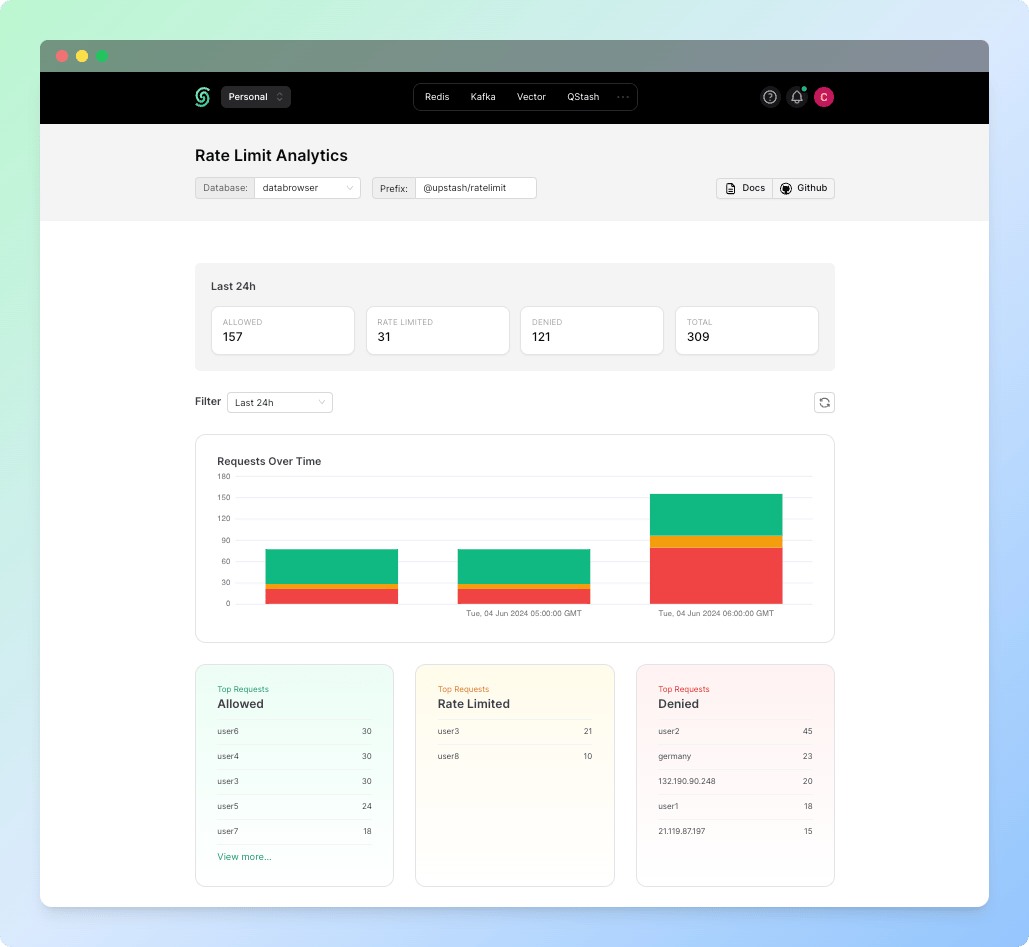
Browse your data, watch metrics, and inspect rate limits without leaving the dashboard.

<Tabs>
  <Tab title="Data Browser">
    <Note>
      Browse, search, and edit your keys directly in the console. Screenshot coming soon.
    </Note>
  </Tab>

  <Tab title="Ratelimit Analytics">
    <Frame>
      <img src="https://mintcdn.com/upstash-docs-landing-rework/onxha2oH1ZYoruUe/img/ratelimit/dashboard.png?fit=max&auto=format&n=onxha2oH1ZYoruUe&q=85&s=a5bc73f4b569ec921bc4d4c3edcb8a5f" alt="Rate limit analytics dashboard" width="1029" height="947" data-path="img/ratelimit/dashboard.png" />
    </Frame>
  </Tab>

  <Tab title="Metrics">
    <Frame>
      <img src="https://mintcdn.com/upstash-docs-landing-rework/2ryyMafw3RQR8NCo/img/getting_started/charts.png?fit=max&auto=format&n=2ryyMafw3RQR8NCo&q=85&s=9db25eb9fc313e83ecdb7a43681d4189" alt="Upstash Redis metrics in the console" width="1000" height="190" data-path="img/getting_started/charts.png" />
    </Frame>
  </Tab>
</Tabs>

## Migrate to Upstash

Moving from another Redis provider? Migration guides are on the way.

<Migrate product="redis" />