> ## Documentation Index
> Fetch the complete documentation index at: https://upstash-docs-landing-rework.mintlify.site/llms.txt
> Use this file to discover all available pages before exploring further.

# Getting Started

> Creating an Upstash Search Database

export const Catalog = ({product, type, featured, cols = 3}) => {
  const catalog = [{
    title: "@upstash/redis",
    description: "HTTP-based Redis client for serverless and edge.",
    href: "/redis/sdks/ts/overview",
    product: "redis",
    type: "sdk",
    lang: "typescript",
    featured: true
  }, {
    title: "upstash-redis (Python)",
    description: "Serverless Redis client for Python.",
    href: "/redis/sdks/py/overview",
    product: "redis",
    type: "sdk",
    lang: "python"
  }, {
    title: "@upstash/ratelimit",
    description: "Rate limiting for serverless, built on Redis.",
    href: "/redis/sdks/ratelimit-ts/overview",
    product: "redis",
    type: "sdk",
    lang: "typescript",
    featured: true
  }, {
    title: "ratelimit (Python)",
    description: "Rate limiting SDK for Python.",
    href: "/redis/sdks/ratelimit-py/overview",
    product: "redis",
    type: "sdk",
    lang: "python"
  }, {
    title: "@upstash/vector",
    description: "Vector database client for AI and LLM apps.",
    href: "/vector/sdks/ts/getting-started",
    product: "vector",
    type: "sdk",
    lang: "typescript",
    featured: true
  }, {
    title: "upstash-vector (Python)",
    description: "Vector database client for Python.",
    href: "/vector/sdks/py/gettingstarted",
    product: "vector",
    type: "sdk",
    lang: "python"
  }, {
    title: "@upstash/qstash",
    description: "Publish messages and schedule jobs over HTTP.",
    href: "/qstash/sdks/ts/overview",
    product: "qstash",
    type: "sdk",
    lang: "typescript",
    featured: true
  }, {
    title: "qstash-py",
    description: "QStash messaging and scheduling for Python.",
    href: "/qstash/sdks/py/overview",
    product: "qstash",
    type: "sdk",
    lang: "python"
  }, {
    title: "@upstash/workflow",
    description: "Durable serverless functions and workflows.",
    href: "/workflow/getstarted",
    product: "workflow",
    type: "sdk",
    lang: "typescript",
    featured: true
  }, {
    title: "@upstash/search",
    description: "Full-text and semantic search client.",
    href: "/search/sdks/ts/getting-started",
    product: "search",
    type: "sdk",
    lang: "typescript",
    featured: true
  }, {
    title: "BullMQ",
    description: "Message queue built on Redis.",
    href: "/redis/integrations/bullmq",
    product: "redis",
    type: "integration",
    lang: "typescript",
    featured: true
  }, {
    title: "Drizzle",
    description: "Cache Drizzle ORM queries with Upstash Redis.",
    href: "/redis/integrations/drizzle",
    product: "redis",
    type: "integration",
    lang: "typescript",
    featured: true
  }, {
    title: "Celery",
    description: "Use Upstash Redis as a Celery broker.",
    href: "/redis/integrations/celery",
    product: "redis",
    type: "integration",
    lang: "python"
  }, {
    title: "Sidekiq",
    description: "Background jobs for Ruby on Upstash Redis.",
    href: "/redis/integrations/sidekiq",
    product: "redis",
    type: "integration",
    lang: "ruby"
  }, {
    title: "MCP Server",
    description: "Manage Upstash Redis from AI agents via MCP.",
    href: "/redis/integrations/mcp",
    product: "redis",
    type: "integration",
    lang: "typescript"
  }, {
    title: "n8n (Redis)",
    description: "Automate workflows with Redis nodes in n8n.",
    href: "/redis/integrations/n8n",
    product: "redis",
    type: "integration",
    lang: "typescript"
  }, {
    title: "Prometheus (Redis)",
    description: "Scrape Upstash Redis metrics into Prometheus.",
    href: "/redis/integrations/prometheus",
    product: "redis",
    type: "integration",
    lang: "typescript"
  }, {
    title: "LangChain",
    description: "Vector store integration for LLM apps.",
    href: "/vector/integrations/langchain",
    product: "vector",
    type: "integration",
    lang: "python",
    featured: true
  }, {
    title: "Vercel AI SDK",
    description: "Back the AI SDK with Upstash Vector.",
    href: "/vector/integrations/ai-sdk",
    product: "vector",
    type: "integration",
    lang: "typescript",
    featured: true
  }, {
    title: "LlamaIndex",
    description: "Use Upstash Vector as a LlamaIndex store.",
    href: "/vector/integrations/llamaindex",
    product: "vector",
    type: "integration",
    lang: "python"
  }, {
    title: "Flowise",
    description: "Build LLM flows on Upstash Vector.",
    href: "/vector/integrations/flowise",
    product: "vector",
    type: "integration",
    lang: "typescript"
  }, {
    title: "Langflow",
    description: "Visual LLM apps backed by Upstash Vector.",
    href: "/vector/integrations/langflow",
    product: "vector",
    type: "integration",
    lang: "python"
  }, {
    title: "LlamaParse",
    description: "Parse and index documents into Upstash Vector.",
    href: "/vector/integrations/llamaparse",
    product: "vector",
    type: "integration",
    lang: "python"
  }, {
    title: "Resend",
    description: "Send emails from QStash workflows.",
    href: "/qstash/integrations/resend",
    product: "qstash",
    type: "integration",
    lang: "typescript",
    featured: true
  }, {
    title: "Anthropic",
    description: "Call Claude reliably through QStash.",
    href: "/qstash/integrations/anthropic",
    product: "qstash",
    type: "integration",
    lang: "typescript"
  }, {
    title: "LLM APIs",
    description: "Queue and retry LLM calls with QStash.",
    href: "/qstash/integrations/llm",
    product: "qstash",
    type: "integration",
    lang: "typescript"
  }, {
    title: "Datadog",
    description: "Monitor QStash with Datadog.",
    href: "/qstash/integrations/datadog",
    product: "qstash",
    type: "integration",
    lang: "typescript"
  }, {
    title: "Pipedream",
    description: "Trigger Pipedream workflows from QStash.",
    href: "/qstash/integrations/pipedream",
    product: "qstash",
    type: "integration",
    lang: "typescript"
  }, {
    title: "n8n (QStash)",
    description: "Publish QStash messages from n8n.",
    href: "/qstash/integrations/n8n",
    product: "qstash",
    type: "integration",
    lang: "typescript"
  }, {
    title: "Docusaurus",
    description: "Add full-text search to a Docusaurus site.",
    href: "/search/integrations/docusaurus",
    product: "search",
    type: "integration",
    lang: "typescript"
  }, {
    title: "AI SDK Code Interpreter",
    description: "Run AI-generated code in a Box sandbox.",
    href: "/box/guides/ai-sdk-code-interpreter",
    product: "box",
    type: "demo",
    lang: "typescript",
    featured: true
  }, {
    title: "E-commerce Order Fulfillment",
    description: "Durable order processing with Workflow.",
    href: "/workflow/examples/eCommerceOrderFulfillment",
    product: "workflow",
    type: "demo",
    lang: "typescript",
    featured: true
  }, {
    title: "Image Processing",
    description: "Fan-out image jobs with Workflow.",
    href: "/workflow/examples/imageProcessing",
    product: "workflow",
    type: "demo",
    lang: "typescript",
    featured: true
  }, {
    title: "Customer Onboarding",
    description: "Multi-step onboarding flow with delays.",
    href: "/workflow/examples/customerOnboarding",
    product: "workflow",
    type: "demo",
    lang: "typescript"
  }, {
    title: "Payment Retry",
    description: "Retry failed payments with backoff.",
    href: "/workflow/examples/paymentRetry",
    product: "workflow",
    type: "demo",
    lang: "typescript"
  }, {
    title: "Wait for Event",
    description: "Pause a workflow until an external event.",
    href: "/workflow/examples/waitForEvent",
    product: "workflow",
    type: "demo",
    lang: "typescript"
  }, {
    title: "Auth Webhook",
    description: "Handle auth webhooks durably.",
    href: "/workflow/examples/authWebhook",
    product: "workflow",
    type: "demo",
    lang: "typescript"
  }];
  const matchesProduct = entry => !product || (Array.isArray(entry.product) ? entry.product.includes(product) : entry.product === product);
  const items = catalog.filter(entry => matchesProduct(entry) && (!type || entry.type === type) && (!featured || entry.featured));
  const gridClass = "u-grid " + (cols >= 3 ? "u-grid--3" : "u-grid--2");
  return <div className={gridClass}>
      {items.map(entry => <a key={entry.href} href={entry.href} className="u-card">
          <img className="u-card__icon" src={`/img/icons/lang/${entry.lang}.svg`} alt={entry.lang} />
          <div className="u-card__body">
            <div className="u-card__title">{entry.title}</div>
            <div className="u-card__desc">{entry.description}</div>
          </div>
        </a>)}
    </div>;
};

***

<iframe
  id="intro-video"
  width="560"
  height="315"
  src="https://www.youtube.com/embed/xVwdHZEkdGI?rel=0&disablekb=1"
  title="YouTube video player"
  frameBorder="0"
  allow="accelerometer; fullscreen;
clipboard-write; encrypted-media; gyroscope"
  allowFullScreen
/>

***

<Tip href="/redis/search/introduction">
  We now have **[Redis Search](/redis/search/introduction)** in Upstash.

  If you are starting a new project, we recommend using **Redis Search**:

  * Index and query your Redis data with a schema.
  * Use advanced query operators and aggregations.
  * Keep your data and search in one place.

  See [Redis Search Introduction](/redis/search/introduction) for details.
</Tip>

***

## Quickstart

Check out our Next.js quickstart guide if you're working in Next.js.

<CardGroup cols={1}>
  <Card title="Next.js" icon="node-js" href="/search/tutorials/nextjs">
    Use Upstash Search in your Next.js app
  </Card>
</CardGroup>

***

## Create a Database

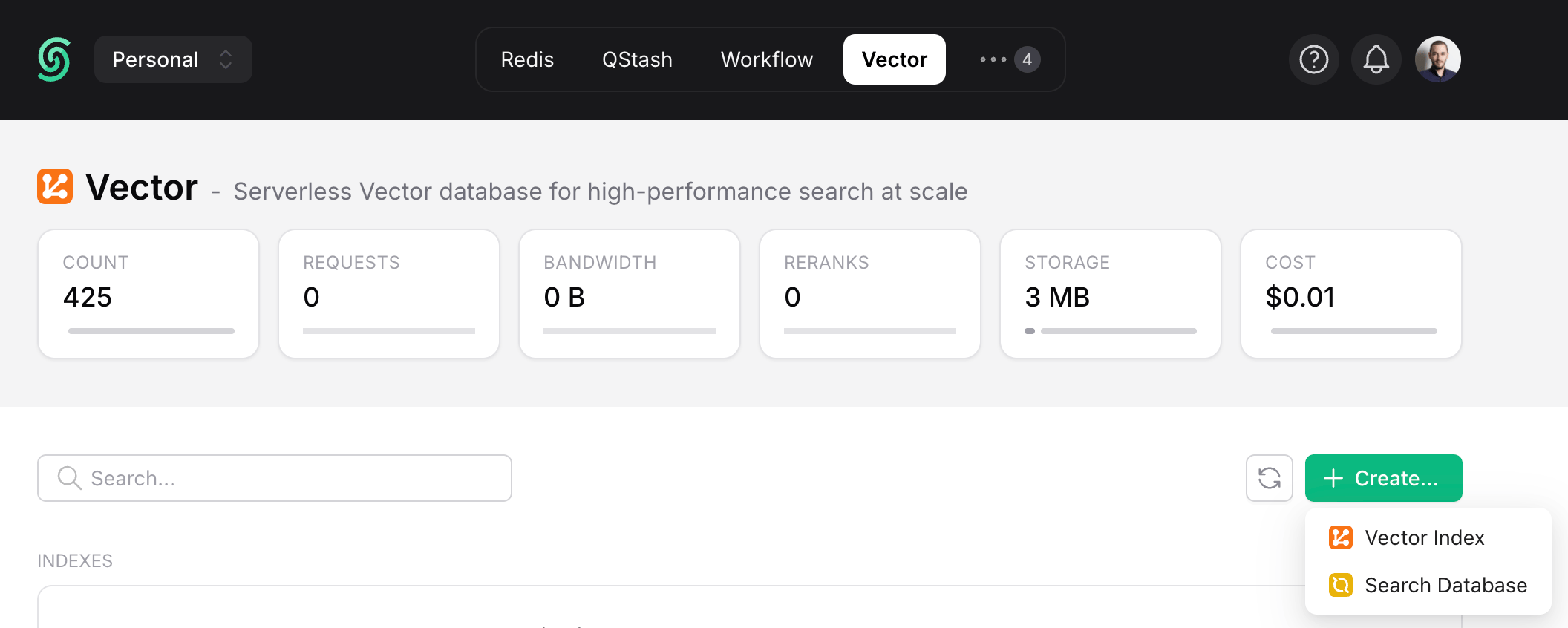
Create a Search Database by navigating to the `Vector` tab and clicking on the `Search Database` button under `Create`.

<Frame style={{ width: "600px" }}>
  <img src="https://mintcdn.com/upstash-docs-landing-rework/Z3e6H4VEhu5dkYCs/img/search/create-database.png?fit=max&auto=format&n=Z3e6H4VEhu5dkYCs&q=85&s=432184077bdd79e7ce9047e70ee633d2" width="2112" height="846" data-path="img/search/create-database.png" />
</Frame>

A dialog with the following options will open:

* **Name:** Type a name for your database (e.g. "product-search").

* **Region:** Choose the region for your database. For best performance, select the region closest to your application.

  *We plan to support additional regions and cloud providers. Feel free to send your requests to [support@upstash.com](mailto:support@upstash.com).*

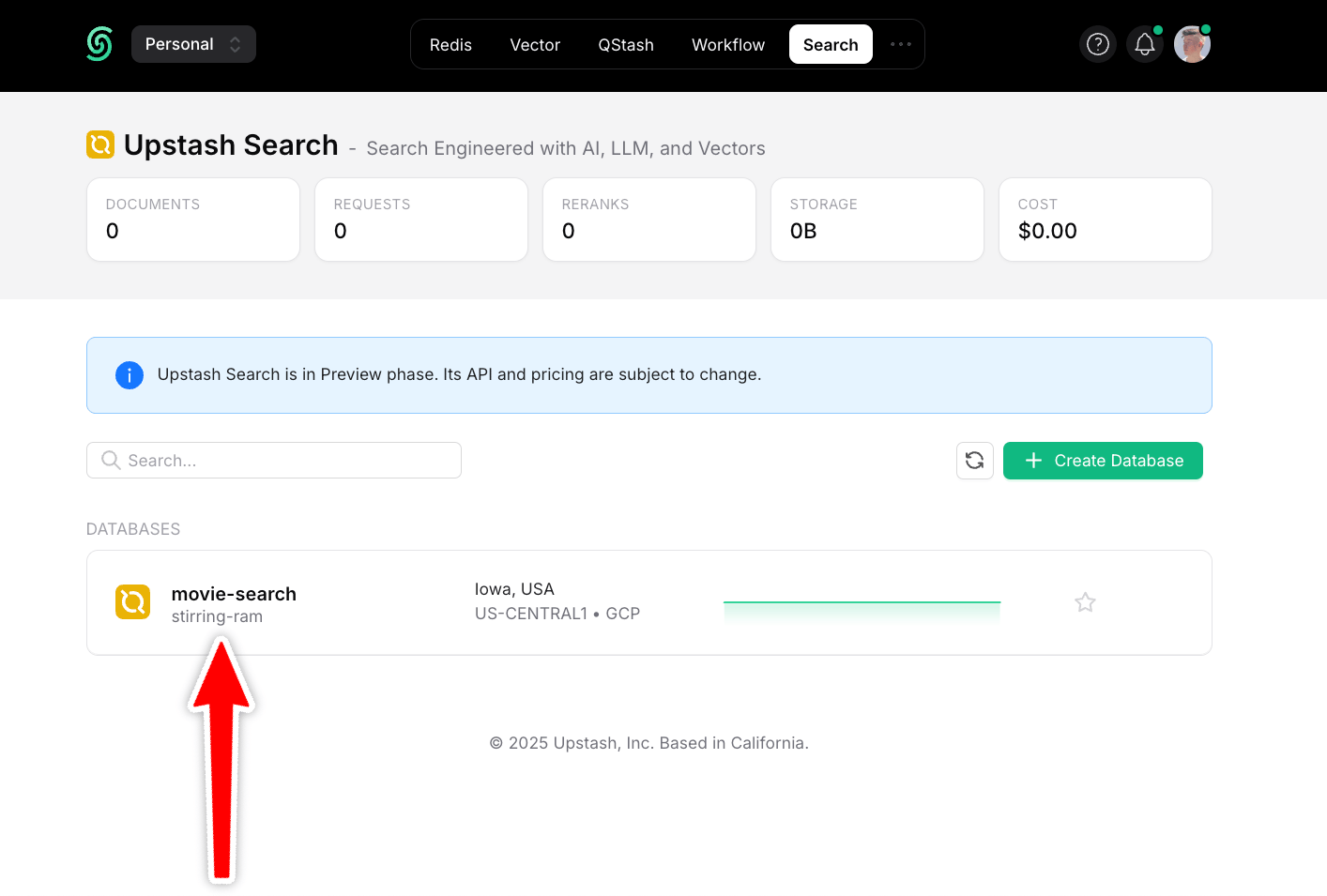
Once you're done, click `Next`, choose a plan, and your Database is ready:
<Frame style={{ width: "600px" }}>
  <img src="https://mintcdn.com/upstash-docs-landing-rework/Z3e6H4VEhu5dkYCs/img/search/database-created.png?fit=max&auto=format&n=Z3e6H4VEhu5dkYCs&q=85&s=ac43c2041bc2e8c3e0d776e0872264da" width="1414" height="955" data-path="img/search/database-created.png" />
</Frame>

***

## Add Documents

Add documents to your database using our REST API, our SDKs, or directly in the dashboard.

### 1. Add Documents via Dashboard

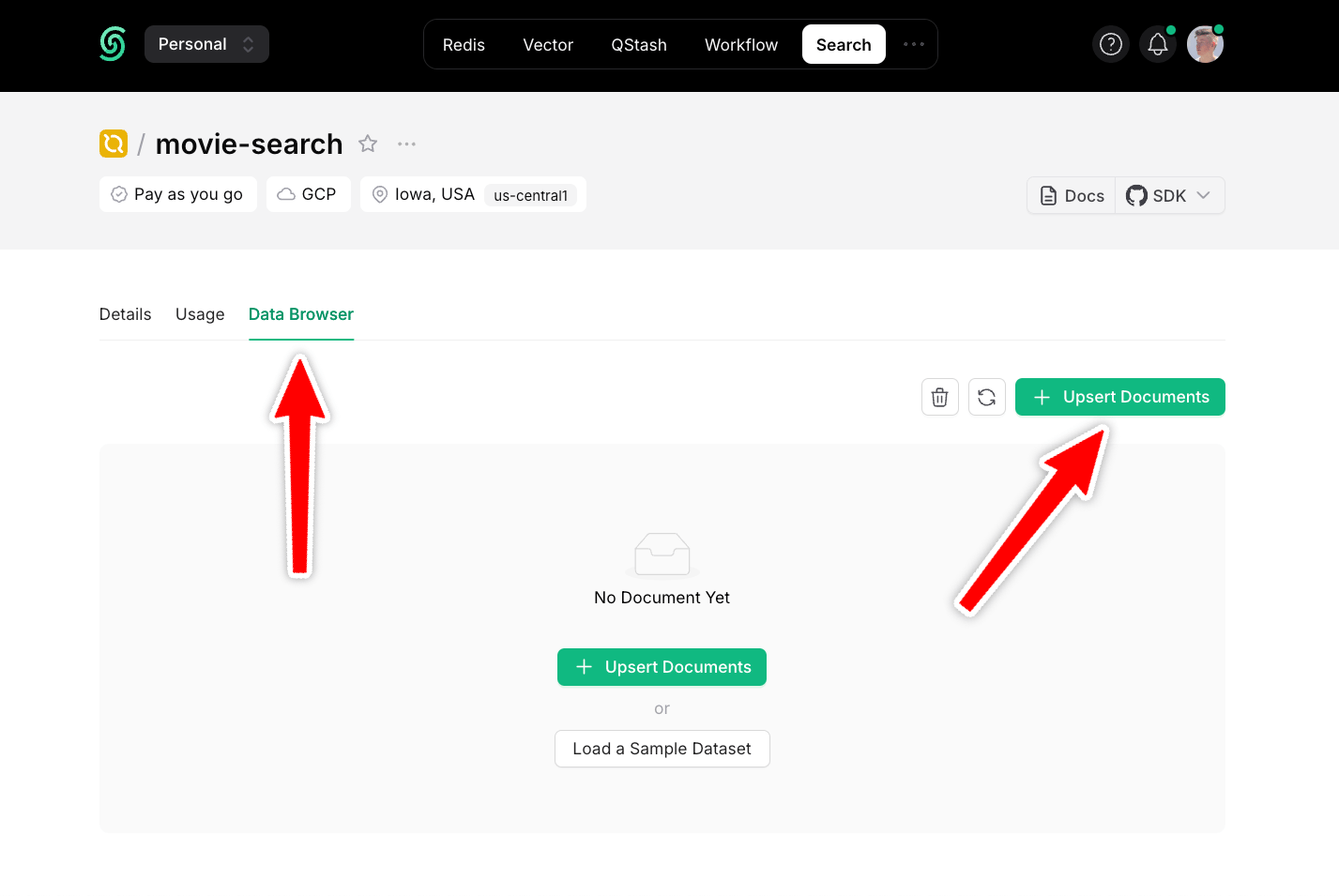
Navigate to the `Data Browser` section of your Database and click `Upsert Documents`:
<Frame style={{ width: "600px" }}>
  <img src="https://mintcdn.com/upstash-docs-landing-rework/onxha2oH1ZYoruUe/img/search/add-data.png?fit=max&auto=format&n=onxha2oH1ZYoruUe&q=85&s=dd618d64ffe916489018c7f0af664b34" width="1427" height="955" data-path="img/search/add-data.png" />
</Frame>

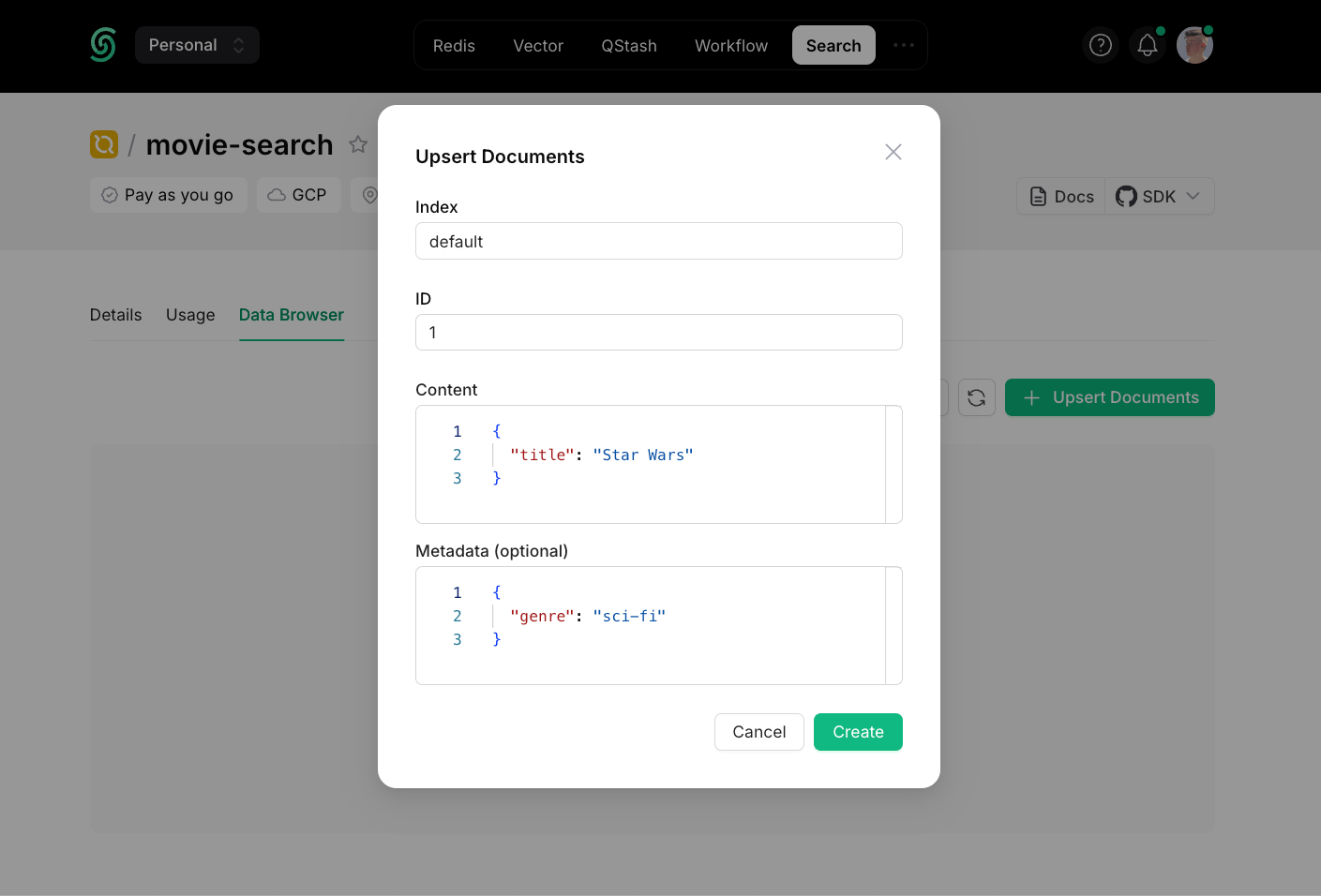
A dialog with the following options will open:
<Frame style={{ width: "600px" }}>
  <img src="https://mintcdn.com/upstash-docs-landing-rework/Z3e6H4VEhu5dkYCs/img/search/add-document.png?fit=max&auto=format&n=Z3e6H4VEhu5dkYCs&q=85&s=3f4244de94754a0046436f3f0b647525" width="1409" height="956" data-path="img/search/add-document.png" />
</Frame>

* **Index:** An [index](/search/features/indexes) to group your data.

  *If you plan to query all documents in one place, you only need one index (e.g. "product-search"). If you plan to add multi-tenancy, so that each user can only search their own data, for example, you can create one index per user ("user-1", "user-2", etc.).*

* **ID:** An automatically generated ID.

* **Content:** The searchable data in JSON format.

* **Metadata:** Optional information attached to this document.

More information about content and metadata can be found [here](/search/features/content-and-metadata).

***

### 2. Add Documents via SDKs
<Tabs>
  <Tab title="Python">
    ```python theme={null}
    from upstash_search import Search

    client = Search(
        url="<UPSTASH_SEARCH_REST_URL>",
        token="<UPSTASH_SEARCH_REST_TOKEN>",
    )

    index = client.index("movies")

    index.upsert(
        documents=[
            {
                "id": "movie-0",
                "content": {
                    "title": "Star Wars",
                    "overview": "Sci-fi space opera",
                    "genre": "sci-fi",
                    "category": "classic",
                },
                "metadata": {
                    "poster": "https://poster.link/starwars.jpg",
                },
            },
        ],
    )
    ```
  </Tab>

  <Tab title="TypeScript">
    ```ts theme={null}
    import { Search } from "@upstash/search"

    const client = new Search({
      url: "<SEARCH_INDEX_REST_URL>",
      token: "<SEARCH_INDEX_REST_TOKEN>",
    })

    const index = client.index("movies")

    await index.upsert([
      {
        id: "star-wars",
        content: { title: "Star Wars", genre: "sci-fi", category: "classic" },
        metadata: { director: "George Lucas" },
      },
    ])
    ```
  </Tab>
</Tabs>

***

## Search Your Database

You can search across your Database the same way: using our REST API, our SDKs or directly in your dashboard.

### 1. Searching via Dashboard

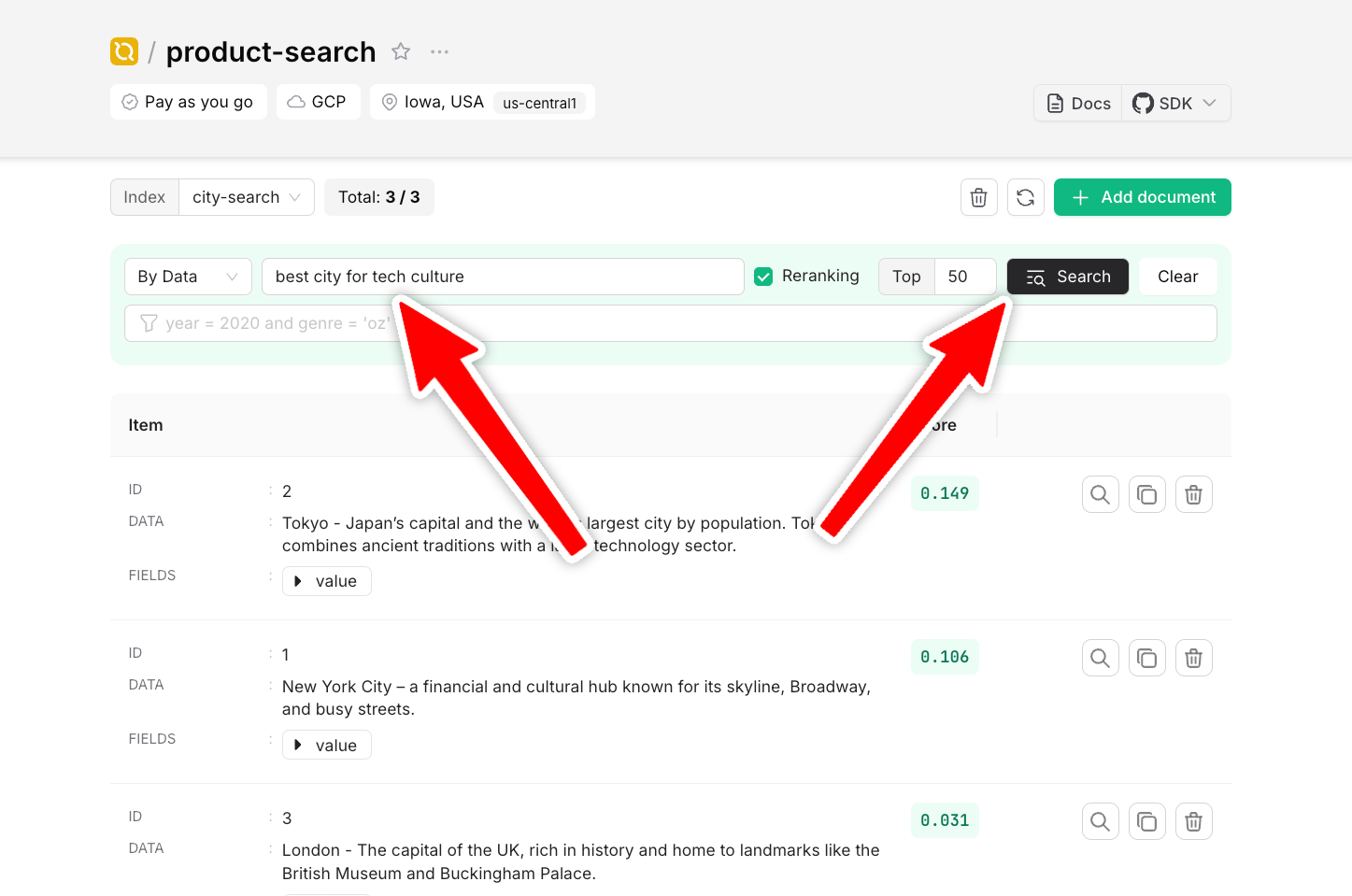
To search your documents, enter a search term and click `Search`:

<Frame style={{ width: "600px" }}>
  <img src="https://mintcdn.com/upstash-docs-landing-rework/Z3e6H4VEhu5dkYCs/img/search/first-search.png?fit=max&auto=format&n=Z3e6H4VEhu5dkYCs&q=85&s=86d1bb0529cfff48c3ca8bbc3e4ba0e5" width="1447" height="959" data-path="img/search/first-search.png" />
</Frame>

### 2. Searching Data via SDKs

<Tabs>
  <Tab title="Python">
    ```py theme={null}
    scores = index.search( query="space opera", limit=2, )
    ```
  </Tab>

  <Tab title="TypeScript">
    ```ts theme={null}
    const searchResults = await index.search({
      query: "space opera",
      limit: 2,
      reranking: true,
    });
    ```
  </Tab>
</Tabs>

***

**That's it!** 🎉 You've just created your first serverless search database with Upstash Search!

But this is just the beginning. Upstash Search also supports:

* Advanced reranking
* Fine-grained control over search results
* Metadata-based filtering

We'll get into those features in the next sections of this documentation. For now, you've already mastered the basics!

## SDKs

<Catalog product="search" type="sdk" cols={3} />

## Integrations

<Catalog product="search" type="integration" cols={3} />