> ## Documentation Index
> Fetch the complete documentation index at: https://upstash-docs-landing-rework.mintlify.site/llms.txt
> Use this file to discover all available pages before exploring further.

# Overview

export const Catalog = ({product, type, featured, cols = 3}) => {
  const catalog = [{
    title: "@upstash/redis",
    description: "HTTP-based Redis client for serverless and edge.",
    href: "/redis/sdks/ts/overview",
    product: "redis",
    type: "sdk",
    lang: "typescript",
    featured: true
  }, {
    title: "upstash-redis (Python)",
    description: "Serverless Redis client for Python.",
    href: "/redis/sdks/py/overview",
    product: "redis",
    type: "sdk",
    lang: "python"
  }, {
    title: "@upstash/ratelimit",
    description: "Rate limiting for serverless, built on Redis.",
    href: "/redis/sdks/ratelimit-ts/overview",
    product: "redis",
    type: "sdk",
    lang: "typescript",
    featured: true
  }, {
    title: "ratelimit (Python)",
    description: "Rate limiting SDK for Python.",
    href: "/redis/sdks/ratelimit-py/overview",
    product: "redis",
    type: "sdk",
    lang: "python"
  }, {
    title: "@upstash/vector",
    description: "Vector database client for AI and LLM apps.",
    href: "/vector/sdks/ts/getting-started",
    product: "vector",
    type: "sdk",
    lang: "typescript",
    featured: true
  }, {
    title: "upstash-vector (Python)",
    description: "Vector database client for Python.",
    href: "/vector/sdks/py/gettingstarted",
    product: "vector",
    type: "sdk",
    lang: "python"
  }, {
    title: "@upstash/qstash",
    description: "Publish messages and schedule jobs over HTTP.",
    href: "/qstash/sdks/ts/overview",
    product: "qstash",
    type: "sdk",
    lang: "typescript",
    featured: true
  }, {
    title: "qstash-py",
    description: "QStash messaging and scheduling for Python.",
    href: "/qstash/sdks/py/overview",
    product: "qstash",
    type: "sdk",
    lang: "python"
  }, {
    title: "@upstash/workflow",
    description: "Durable serverless functions and workflows.",
    href: "/workflow/getstarted",
    product: "workflow",
    type: "sdk",
    lang: "typescript",
    featured: true
  }, {
    title: "@upstash/search",
    description: "Full-text and semantic search client.",
    href: "/search/sdks/ts/getting-started",
    product: "search",
    type: "sdk",
    lang: "typescript",
    featured: true
  }, {
    title: "BullMQ",
    description: "Message queue built on Redis.",
    href: "/redis/integrations/bullmq",
    product: "redis",
    type: "integration",
    lang: "typescript",
    featured: true
  }, {
    title: "Drizzle",
    description: "Cache Drizzle ORM queries with Upstash Redis.",
    href: "/redis/integrations/drizzle",
    product: "redis",
    type: "integration",
    lang: "typescript",
    featured: true
  }, {
    title: "Celery",
    description: "Use Upstash Redis as a Celery broker.",
    href: "/redis/integrations/celery",
    product: "redis",
    type: "integration",
    lang: "python"
  }, {
    title: "Sidekiq",
    description: "Background jobs for Ruby on Upstash Redis.",
    href: "/redis/integrations/sidekiq",
    product: "redis",
    type: "integration",
    lang: "ruby"
  }, {
    title: "MCP Server",
    description: "Manage Upstash Redis from AI agents via MCP.",
    href: "/redis/integrations/mcp",
    product: "redis",
    type: "integration",
    lang: "typescript"
  }, {
    title: "n8n (Redis)",
    description: "Automate workflows with Redis nodes in n8n.",
    href: "/redis/integrations/n8n",
    product: "redis",
    type: "integration",
    lang: "typescript"
  }, {
    title: "Prometheus (Redis)",
    description: "Scrape Upstash Redis metrics into Prometheus.",
    href: "/redis/integrations/prometheus",
    product: "redis",
    type: "integration",
    lang: "typescript"
  }, {
    title: "LangChain",
    description: "Vector store integration for LLM apps.",
    href: "/vector/integrations/langchain",
    product: "vector",
    type: "integration",
    lang: "python",
    featured: true
  }, {
    title: "Vercel AI SDK",
    description: "Back the AI SDK with Upstash Vector.",
    href: "/vector/integrations/ai-sdk",
    product: "vector",
    type: "integration",
    lang: "typescript",
    featured: true
  }, {
    title: "LlamaIndex",
    description: "Use Upstash Vector as a LlamaIndex store.",
    href: "/vector/integrations/llamaindex",
    product: "vector",
    type: "integration",
    lang: "python"
  }, {
    title: "Flowise",
    description: "Build LLM flows on Upstash Vector.",
    href: "/vector/integrations/flowise",
    product: "vector",
    type: "integration",
    lang: "typescript"
  }, {
    title: "Langflow",
    description: "Visual LLM apps backed by Upstash Vector.",
    href: "/vector/integrations/langflow",
    product: "vector",
    type: "integration",
    lang: "python"
  }, {
    title: "LlamaParse",
    description: "Parse and index documents into Upstash Vector.",
    href: "/vector/integrations/llamaparse",
    product: "vector",
    type: "integration",
    lang: "python"
  }, {
    title: "Resend",
    description: "Send emails from QStash workflows.",
    href: "/qstash/integrations/resend",
    product: "qstash",
    type: "integration",
    lang: "typescript",
    featured: true
  }, {
    title: "Anthropic",
    description: "Call Claude reliably through QStash.",
    href: "/qstash/integrations/anthropic",
    product: "qstash",
    type: "integration",
    lang: "typescript"
  }, {
    title: "LLM APIs",
    description: "Queue and retry LLM calls with QStash.",
    href: "/qstash/integrations/llm",
    product: "qstash",
    type: "integration",
    lang: "typescript"
  }, {
    title: "Datadog",
    description: "Monitor QStash with Datadog.",
    href: "/qstash/integrations/datadog",
    product: "qstash",
    type: "integration",
    lang: "typescript"
  }, {
    title: "Pipedream",
    description: "Trigger Pipedream workflows from QStash.",
    href: "/qstash/integrations/pipedream",
    product: "qstash",
    type: "integration",
    lang: "typescript"
  }, {
    title: "n8n (QStash)",
    description: "Publish QStash messages from n8n.",
    href: "/qstash/integrations/n8n",
    product: "qstash",
    type: "integration",
    lang: "typescript"
  }, {
    title: "Docusaurus",
    description: "Add full-text search to a Docusaurus site.",
    href: "/search/integrations/docusaurus",
    product: "search",
    type: "integration",
    lang: "typescript"
  }, {
    title: "AI SDK Code Interpreter",
    description: "Run AI-generated code in a Box sandbox.",
    href: "/box/guides/ai-sdk-code-interpreter",
    product: "box",
    type: "demo",
    lang: "typescript",
    featured: true
  }, {
    title: "E-commerce Order Fulfillment",
    description: "Durable order processing with Workflow.",
    href: "/workflow/examples/eCommerceOrderFulfillment",
    product: "workflow",
    type: "demo",
    lang: "typescript",
    featured: true
  }, {
    title: "Image Processing",
    description: "Fan-out image jobs with Workflow.",
    href: "/workflow/examples/imageProcessing",
    product: "workflow",
    type: "demo",
    lang: "typescript",
    featured: true
  }, {
    title: "Customer Onboarding",
    description: "Multi-step onboarding flow with delays.",
    href: "/workflow/examples/customerOnboarding",
    product: "workflow",
    type: "demo",
    lang: "typescript"
  }, {
    title: "Payment Retry",
    description: "Retry failed payments with backoff.",
    href: "/workflow/examples/paymentRetry",
    product: "workflow",
    type: "demo",
    lang: "typescript"
  }, {
    title: "Wait for Event",
    description: "Pause a workflow until an external event.",
    href: "/workflow/examples/waitForEvent",
    product: "workflow",
    type: "demo",
    lang: "typescript"
  }, {
    title: "Auth Webhook",
    description: "Handle auth webhooks durably.",
    href: "/workflow/examples/authWebhook",
    product: "workflow",
    type: "demo",
    lang: "typescript"
  }];
  const matchesProduct = entry => !product || (Array.isArray(entry.product) ? entry.product.includes(product) : entry.product === product);
  const items = catalog.filter(entry => matchesProduct(entry) && (!type || entry.type === type) && (!featured || entry.featured));
  const gridClass = "u-grid " + (cols >= 3 ? "u-grid--3" : "u-grid--2");
  return <div className={gridClass}>
      {items.map(entry => <a key={entry.href} href={entry.href} className="u-card">
          <img className="u-card__icon" src={`/img/icons/lang/${entry.lang}.svg`} alt={entry.lang} />
          <div className="u-card__body">
            <div className="u-card__title">{entry.title}</div>
            <div className="u-card__desc">{entry.description}</div>
          </div>
        </a>)}
    </div>;
};

Upstash Workflow lets you write **durable, reliable and performant serverless functions**. Get delivery guarantees, automatic retries on failure, scheduling and more without managing any infrastructure.

<iframe id="intro-video" width="720" height="405" src="https://www.youtube.com/embed/5As9tZMN3a8?rel=0&disablekb=1" title="YouTube video player" frameBorder="0" allow="accelerometer; fullscreen; clipboard-write; encrypted-media; gyroscope" allowFullScreen />

## Quickstarts

Upstash Workflow supports Next.js, Cloudflare Workers and [many other frameworks](/workflow/quickstarts/platforms) in TypeScript and Python.

<CardGroup cols={2}>
  <Card title="Next.js" icon="node-js" href="/workflow/quickstarts/vercel-nextjs">
    Build a Next.js application with QStash Workflow
  </Card>

  <Card title="Cloudflare Workers" icon="cloudflare" href="/workflow/quickstarts/cloudflare-workers">
    Use and deploy Upstash Workflow on Cloudflare Workers
  </Card>

  <Card title="Next.js & FastAPI" icon="python" href="/workflow/quickstarts/nextjs-fastapi">
    Use Upstash Workflow for Python with Next.js and FastAPI
  </Card>
</CardGroup>

## Key Features

<CardGroup cols={2}>
  <Card title="Failure Resilience" icon="shield">
    If your platform experiences a temporary outage, your workflow can pick up right where it left off, ensuring stability even in unstable environments.
  </Card>

  <Card title="Long-Running Executions" icon="clock">
    Run long-running REST endpoints, such as complex AI models or video processing tools, even on serverless platforms with strict time limits.
  </Card>

  <Card title="Events with Wait/Notify Mechanism" icon="bell" href="/workflow/features/wait-for-event">
    Create workflows that wait for external events before proceeding. Ideal for user confirmations and asynchronous notifications.
  </Card>

  <Card title="Scheduled Jobs" icon="calendar" href="/workflow/howto/schedule">
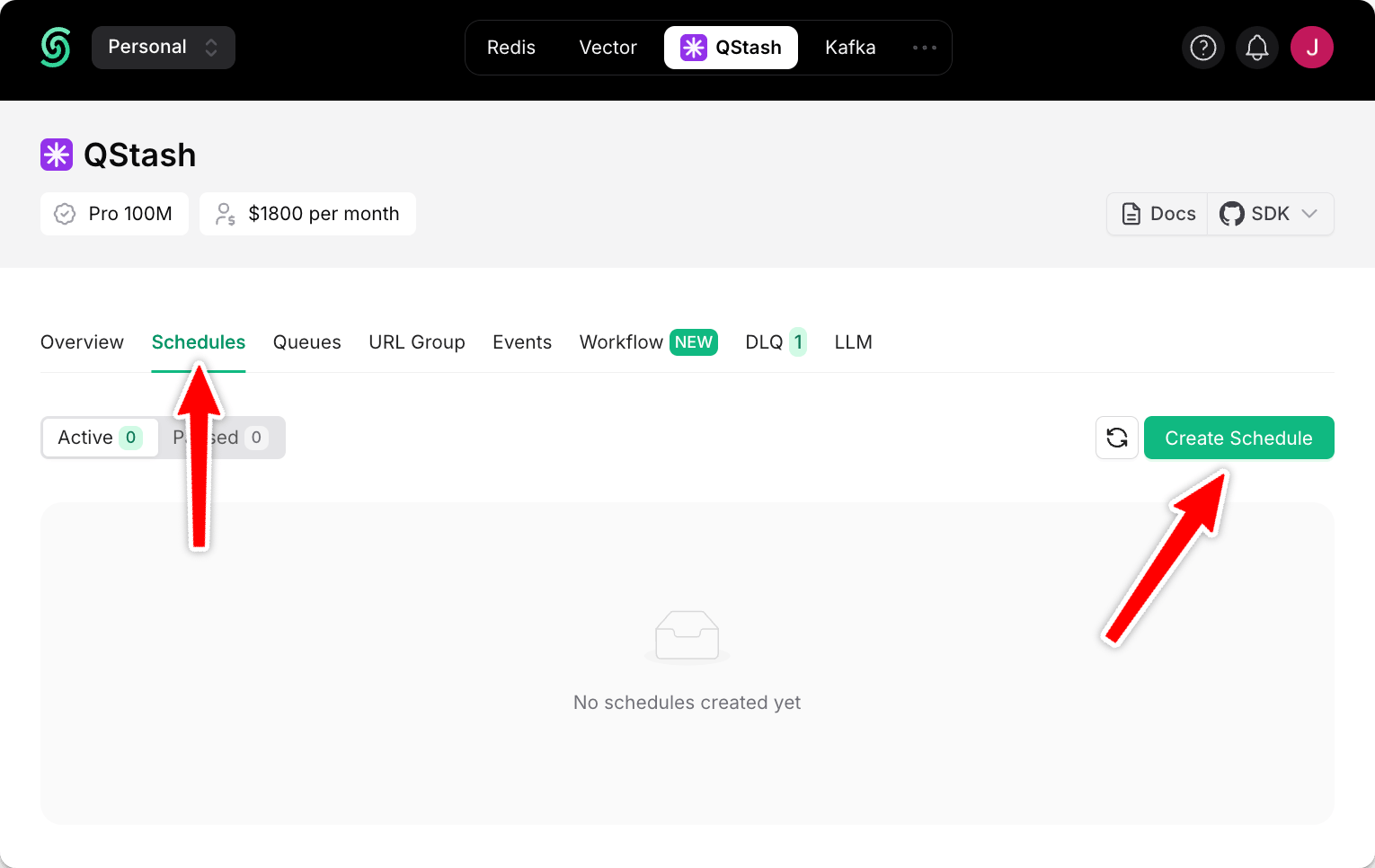
    Run jobs at regular intervals with support for cron expressions. Perfect for recurring tasks like reminders, reports, or newsletters.
  </Card>

  <Card title="Parallel Runs" icon="road" href="/workflow/features/parallel-steps">
    Start independent tasks in parallel and wait for them to finish simultaneously, reducing latency.
  </Card>

  <Card title="Long Delays" icon="hourglass" href="/workflow/basics/context/sleep">
    Need your code to “sleep” for days, weeks, or even months? Supports long delays beyond serverless time limits.
  </Card>

  <Card title="Delivery Guarantees" icon="rotate-right">
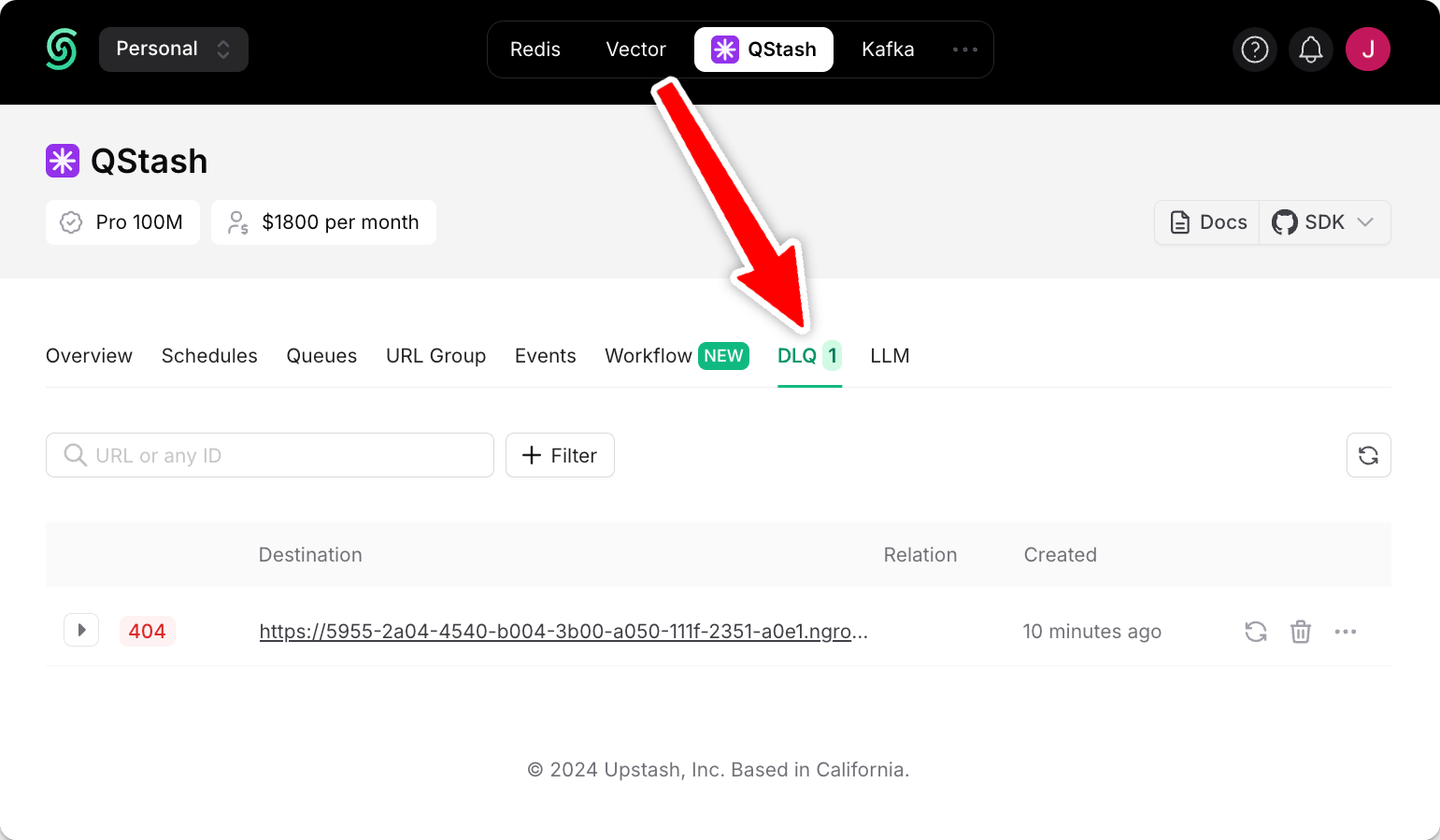
    Ensures at-least-once delivery. Failed requests are logged in a Dead Letter Queue to prevent data loss.
  </Card>

  <Card title="Flow Control" icon="gauge" href="/workflow/features/flow-control">
    Prevent overwhelming your app or external services by configuring rate per second or parallelism limits.
  </Card>

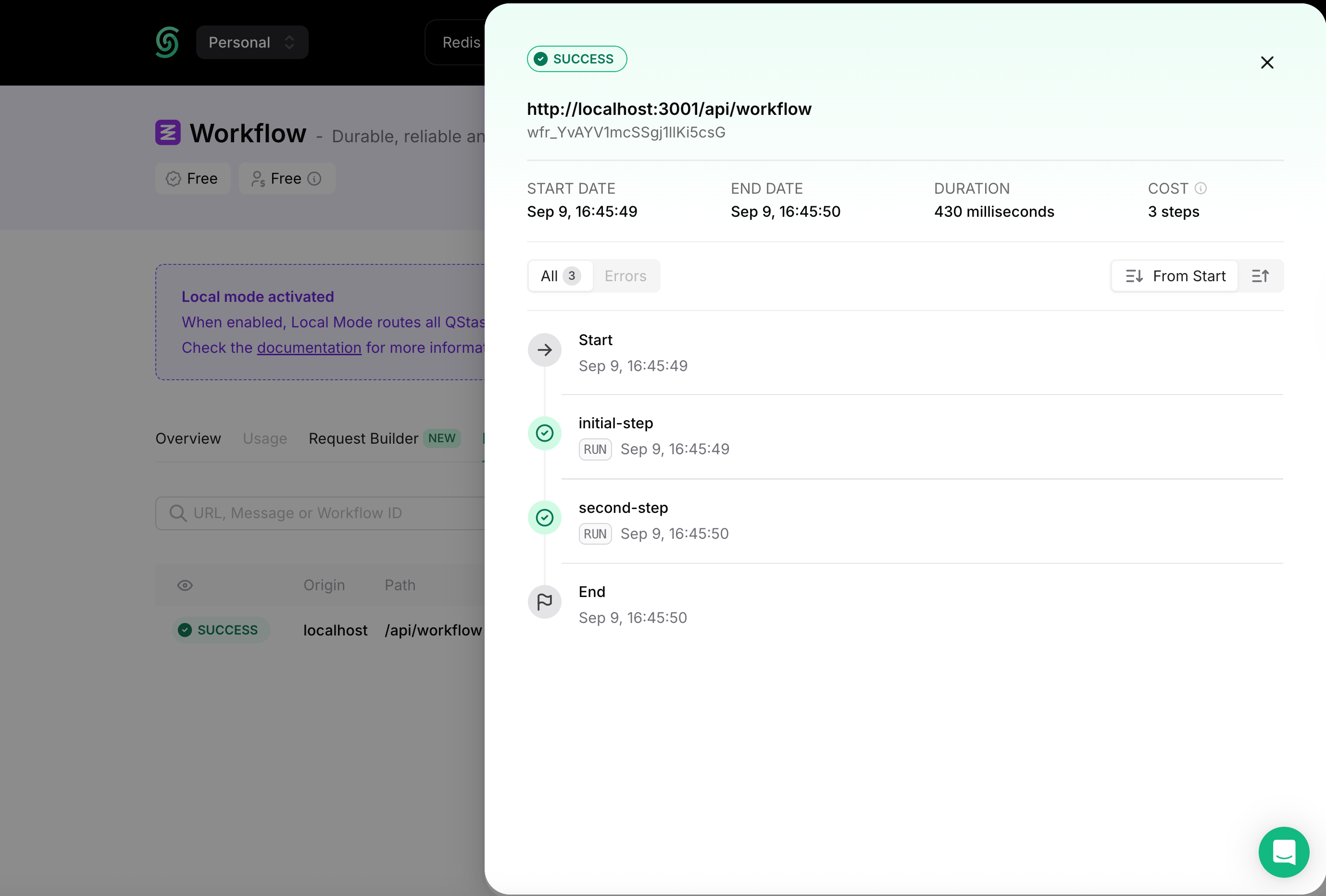
  <Card title="Observability" icon="eye" href="/workflow/basics/client/logs">
    Monitor workflow steps with insights. Filter events to track successes, failures, retries, and stalls.
  </Card>
</CardGroup>

## Example Use Cases

Here are some example real world use-cases for Upstash Workflow:

<CardGroup cols={2}>
  <Card title="Agents" icon="robot" href="/workflow/agents/overview">
    Use LLM Agents equipped with custom tools to achieve tasks
  </Card>

  <Card title="AI Data Processing" icon="sparkles" href="/workflow/examples/allInOne">
    Download a large dataset without timeouts, process the data in chunks and generate a report.
  </Card>

  <Card title="Waiting For Events" icon="traffic-light" href="/workflow/examples/waitForEvent">
    Control workflow execution with events, log event data and send emails
  </Card>

  <Card title="Authorization Webhook" icon="webhook" href="/workflow/examples/authWebhook">
    Start a workflow from a webhook. Handle user creation, trial management,
    email reminders and notifications.
  </Card>

  <Card title="Customer Onboarding" icon="user" href="/workflow/examples/customerOnboarding">
    Register a new user, send welcome emails, and periodically check and respond
    to the user's activity state with emails.
  </Card>

  <Card title="E-Commerce Order Fulfillment" icon="cart-flatbed-boxes" href="/workflow/examples/eCommerceOrderFulfillment">
    Receive an order request, verify the stock, process the payment, and handle
    order dispatch and customer notifications.
  </Card>

  <Card title="Image Processing" icon="image" href="/workflow/examples/imageProcessing">
    Manage uploading images to the data store. Apply filters and resize the
    images to different resolutions in parallel.
  </Card>

  <Card title="Retry Payments" icon="credit-card" href="/workflow/examples/paymentRetry">
    Retry payments with a day of delay, send emails, and suspend account if
    payment fails after the retries.
  </Card>
</CardGroup>

## How it works

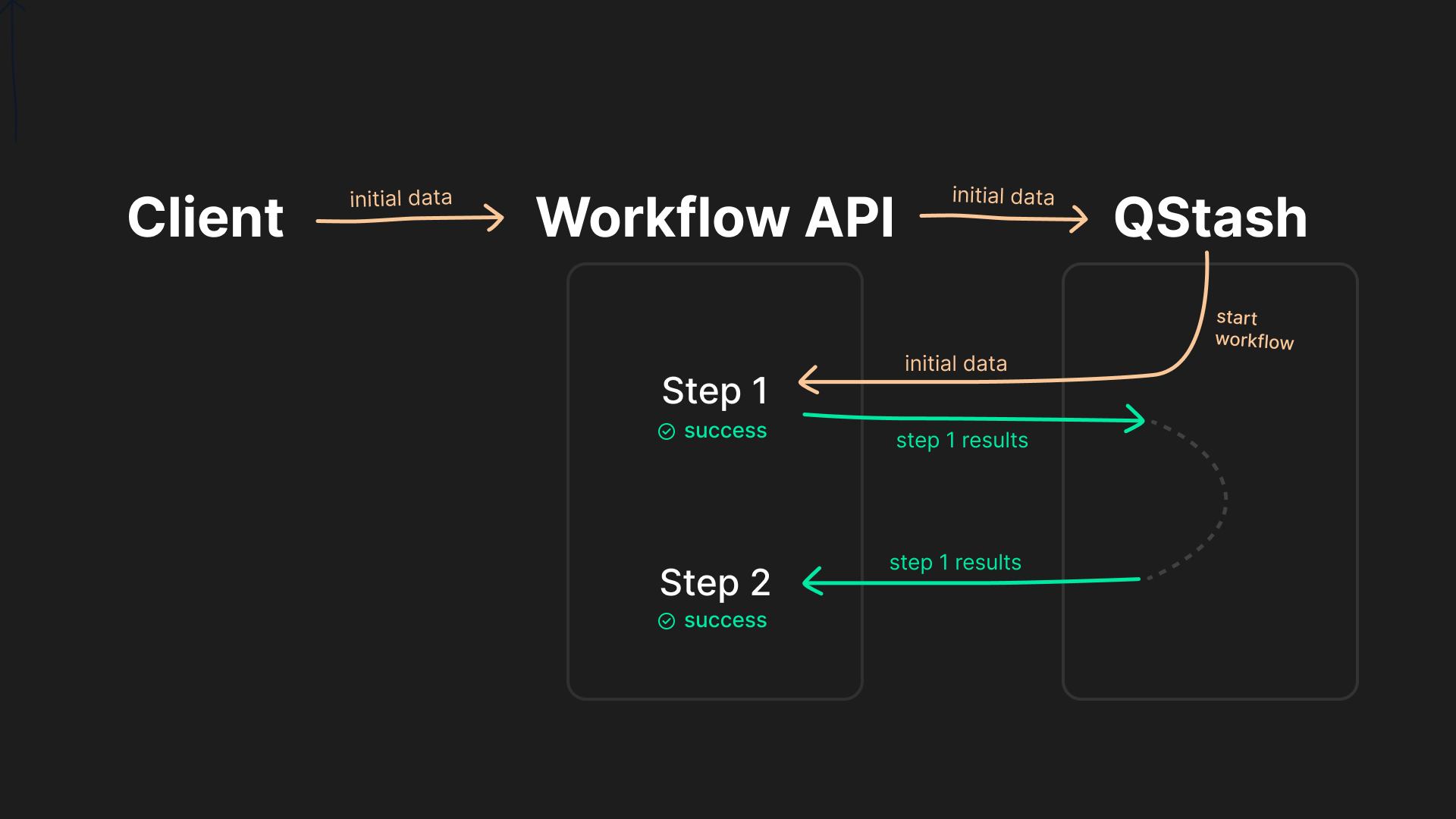
Upstash Workflow builds on the principle of steps. Instead of defining a single, complex piece of business logic, workflows contain multiple individual steps.

Each of the steps are executed by a separate request to your application, by preserving the output of previous steps.

In case of an error, a failed step is retried individually without needing to re-run any previous steps. Instead of the entire business logic, *each step* can take up your serverless function execution duration, and many more benefits.

<Frame>
  <img src="https://mintcdn.com/upstash-docs-landing-rework/onxha2oH1ZYoruUe/img/qstash-workflow/workflow-concept.png?fit=max&auto=format&n=onxha2oH1ZYoruUe&q=85&s=6f9dd979f4c7d7fcdfff6b1360d87d3d" width="1920" height="1080" data-path="img/qstash-workflow/workflow-concept.png" />
</Frame>

## Support

Need help or have questions? We're here to support you:

* Join our Discord community to ask questions and share feedback
* Open a ticket through the Intercom chatbox in the dashboard for any issue

## SDKs

<Catalog product="workflow" type="sdk" cols={3} />

## Demos

<Catalog product="workflow" type="demo" cols={3} />

## Do more from the console

Watch runs, inspect steps, and manage failures without leaving the dashboard.

<Tabs>
  <Tab title="Runs">
    <Frame>
      <img src="https://mintcdn.com/upstash-docs-landing-rework/onxha2oH1ZYoruUe/img/qstash-workflow/run-view.png?fit=max&auto=format&n=onxha2oH1ZYoruUe&q=85&s=bf142563019f9cd81ea8a72990e34972" alt="Workflow run inspector" width="2758" height="1864" data-path="img/qstash-workflow/run-view.png" />
    </Frame>
  </Tab>

  <Tab title="DLQ">
    <Frame>
      <img src="https://mintcdn.com/upstash-docs-landing-rework/onxha2oH1ZYoruUe/img/qstash-workflow/workflow_dlq.png?fit=max&auto=format&n=onxha2oH1ZYoruUe&q=85&s=35215a56e8db3bcb936740c9ad886e01" alt="Workflow dead-letter queue" width="1541" height="899" data-path="img/qstash-workflow/workflow_dlq.png" />
    </Frame>
  </Tab>

  <Tab title="Schedules">
    <Frame>
      <img src="https://mintcdn.com/upstash-docs-landing-rework/onxha2oH1ZYoruUe/img/qstash-workflow/create_schedule.png?fit=max&auto=format&n=onxha2oH1ZYoruUe&q=85&s=503e57e8aae2c8db1b1337a041348b77" alt="Workflow schedules" width="1530" height="966" data-path="img/qstash-workflow/create_schedule.png" />
    </Frame>
  </Tab>
</Tabs>